MyDrinkaware App is a free to download and use app with no annoying advert pop ups and is available from the App store and Google Play. The goal of the app is to help you to drink less – and abstain if possible.
The Set Up
First of all, you can’t start to use the app without registering first. There will be those who don’t want to enter their private details into an alcohol reduction app, so this may stop people taking the next step.
There is a two factor authorisation using your email address to verify your email address – so don’t g making one up to get to the next stage.
The Questionnaire
Before going any further, the app directs you to their version of the AUDIT test – check out the Drink Less Method’s similar test here. The World Health Organisation’s test determines if the amount you are drinking could be putting your health at risk.
This step can be skipped, but if you have never taken a similar test, it is worth carrying out. If you don’t take the test, the app will keep reminding you, so it’s best to take the test on set up. It only takes a minute or two.
The Dashboard
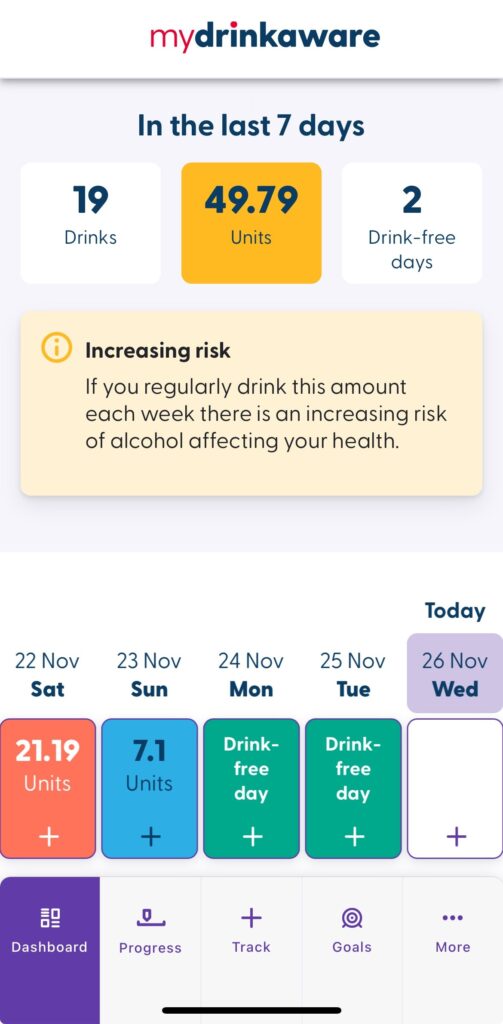
The layout is straightforward and easy to understand with a handy summary at the top of drink free days, units and number of drinks consumed plus your current risk level based on a rolling 7 days. central calendar running through. When updated, the calendar holds a colour-coded summary of how well or badly you performed on each day.
At the foot of the dashboard you can set and view your weekly goals – measured by the number of drink free days and/or the number of units consumed.
Daily Tracking
At the heart of the app is the data that you have to enter regarding your drinking. Firstly, you track each day whether you had a drink or not. If you did have a drink then take some time to enter the quantities and types accurately, so the app can calculate the units.
An additional feature – and one that is quick to use – is the facility to rate your sleep – Poor, Average or Great.
Tracking your drink is a little fiddly to start off with as there is a wide choice available – the ‘Drink Free Days’ app from the NHS makes it more straightforward, but the MyDrinkaware app will yield more accurate results if you enter the data correctly. It is fair to say that most people will drink similar drinks most of the time. The MyDrinkaware app takes this into account and allows you to give a drink a name which will appear under your ‘recents’ lists – a much easier way to enter the data.
Progress Reporting
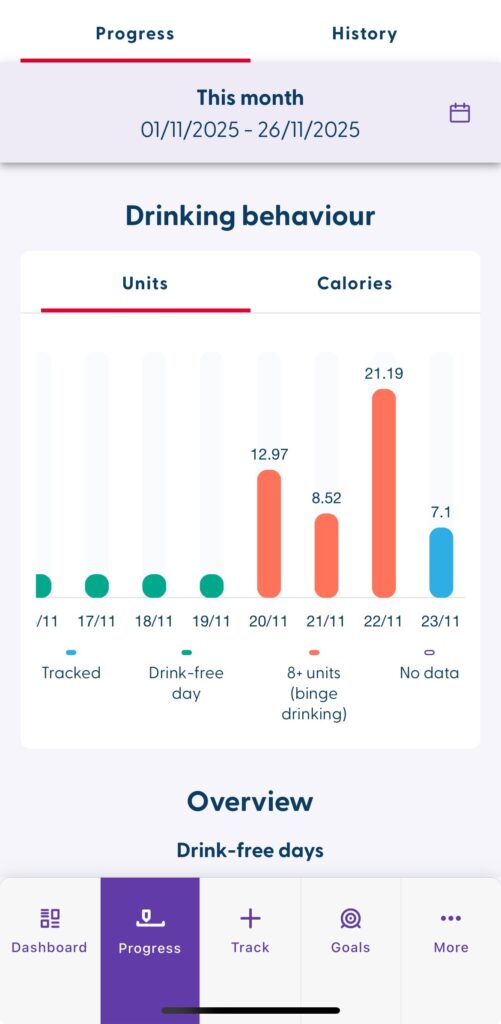
The app offers a simple to use graph of your number of units and calories consumed through drinking. Again, the levels of consumption on the bar charts are colour coded to give you a clear view of what bad looks like. You can change the date range to look at this week, last week, this month or any single month in the past.
A year on year comparison facility would be helpful here as we all know that there is a seasonality to increased alcohol consumption – especially at Christmas time.